Back to Main Menu
| 
|
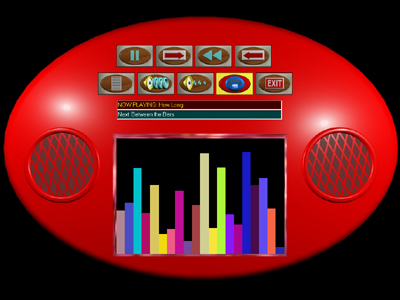
Switch Accessible Boombox
| Item #977
Price:
$39 - CD
(Can be installed on one computer at a time)
$29 - Download
(Can be installed on one computer at a time)
$99 - Classroom License CD
(Can be installed on an unlimited number of computers as long as they are in the same physical classroom)
Download Store - Free Trials and Purchases
| | |
Features of Switch Accessible Boombox
Buttons on the boombox are controlled by switches or a touch window.
You are able to eliminate buttons from showing up on the boombox to simplify the choices.
Add your own music or film clips.
Change the color of the boombox instantly.
Ability to turn it into a simple single switch Cause & Effect activity.
Optionally turn on auditory narration of the buttons.
Optionally have the program say the name of the song before it is played using synthesized speech.
Totally customize the auditory narration of the buttons to a foreign language.
|
| | Program Description |
Switch Accessible Boombox is a software program that allows a user to
utilize a virtual stereo (boombox).
The program allows you to play your favorite songs or video clips through this boombox.
The buttons on the boombox are pressed using one switch with timed scanning, two switches
with step scanning or directly pressing them with a touch window or mouse. Optionally, auditory
scanning of the buttons can be turned on.
In its simplest form, it can also be used as a very basic single switch
Cause & Effect program. Pressing the switch will stop and start the music.
This program has the added benefit of not only playing songs but movie clips as well.
The song formats that the program can play are MP3, WMA (Windows Media Audio), WAV (Wave Files) and MID (Midi Files).
Valid movie formats are MPG, WMV and AVI.
Optionally, speech synthesis (included with this program) will read the title of the song
or movie clip before it is played. The buttons that appear on the screen (play, skip, raise volume..)
can either be displayed as words or pictures. Buttons can be
removed from the boombox in order to simplify the choices.
| | Skills Introduced | | System Requirements | Choice Making
| |
Windows Versions: Windows 10/8/7/Vista/XP
40 Meg Hard Disk Space
|
|
|