Back to Main Menu
| 
Desktop Maker
Accesible Desktop for Switch Users
| Item #901
Price:
$49 - CD
(Can be installed on one computer at a time)
$125 - Classroom License CD
(Can be installed on an unlimited number of computers as long as they are in the same physical classroom)
Note:
Downloads are not avaliable for
this program
| | |
Desktop Maker can be used to launch ANY program,
not just Judy Lynn Software programs
The benefits of using Desktop Maker
Small icons are replaced with large graphic images.
You can incorporate auditory scanning by either associating a sound (wave) file or synthesized speech with the program.
Only the choices defined for the customized desktop are displayed.
Different forms of scanning can be used to launch a program.
Launching a program can now be performed with 1 or 2 switches, a touch screen, a mouse, or the keyboard.
Scan settings are saved with each customized desktop.
|
| | Program Description |
The Judy Lynn Software Desktop Maker enables you to create customized desktops
that launch Windows� programs. For example, if you only want John to be given
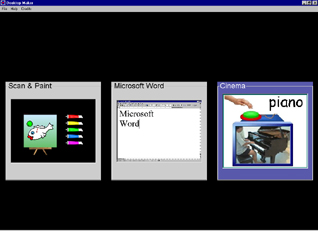
the choice of running Scan & Paint, Microsoft� Word or Cause & Effect Cinema
then you can create a desktop specifically for John that will contain only those
3 programs. Selecting a Windows program to run is accomplished by step scanning,
timed scanning or by clicking on the program with the mouse or touch screen.
Desktop Maker allows you to create an unlimited number of different customized desktops. A customized desktop can contain anywhere from 2 to 20 programs to launch. Desktop Maker does not change your current Windows desktop. The program runs above your current desktop and when you exit Desktop Maker, your original desktop appears.
The customized desktop would look like the illustration above:
| | Skills Introduced | | System Requirements | Scanning
Choice Making
| |
Windows Versions: Windows 7/Vista/XP
5 Meg Hard Disk Space
|
|
|