|
In Sequence - Daily Living Skills
| Item #801
Minimum Cognitive Age Level:
4 Years
Price:
$49 - CD
(Can be installed on one computer at a time)
$39 - Download
(Can be installed on one computer at a time)
$125 - Classroom License CD
(Can be installed on an unlimited number of computers as long as they are in the same physical classroom)
Download Store - Free Trials and Purchases
| | |
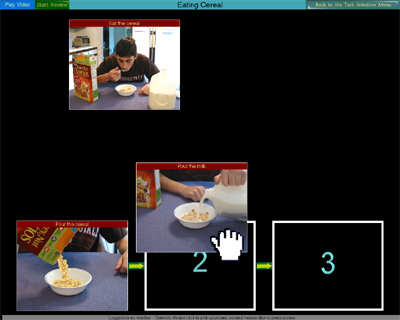
Sample activity of arranging the steps in the task "Eating Cereal."
The student moves the pictures with a switch, mouse or touch window to the chronological position.
|
| | Program Description |
"In Sequence - Daily Living Skills" focuses on the cognitive skill of arranging pictures in a chronological sequence. The pictures are taken from a video clip that is shown prior to the activity representing steps in the task such as "Eating Cereal" or "Washing your Hands." Optionally, when the video is finished, a "Review Lesson" of the sequencing task is presented on the screen showing the correct order of the pictures. After the review, the student is presented with the task of arranging the pictures in chronolical order.
The student can use switches, a mouse, or touch window to accomplish this. There are typically 3 or 4 pictures to sequence in a task. The programs not only comes with many sequencing tasks but also allows you to add your own. The number of steps for a task can range from as little as 2 to a maximum of 10. The program has many built in options to give you the ability to customize the task based on the student's needs. Program settings are saved individually for each student. Statistic are automatically gathered for tasks per student and can be viewed as a text file or in spreadsheet format.
Program Options
Access Mode -
1 switch with timed scanning, 2 switches with step scanning, Mouse or touch window
Response Settings -
Either reveal immediately after the picture is placed whether it is in the correct position or wait until all the pictures are placed before revealing whether they are in the correct positions.
Jump Start Settings -
You can choose to have the computer pre-populate a specified number of pictures automatically in their correct chronological position.
Picture Layout -
Horizontal, Vertical
Auditory Narration -
On, Off
Language Customization -
Ability to re-record auditory phrases used in the program. Useful for voice familiarity or to overlay voices in a different language.
Tasks included with the program
Getting in a car and putting on a seatbelt, eating a banana, putting on a bandaid,
brushing your teeth, eating cake, buying candy from a vending machine, eating cereal,
making a cheese sandwich, sweeping the floor, putting on a coat, baking cookies,
eating a hamburger, throwing out the garbage, buying gum, folding clothes after doing the laundry,
numbers 1-10, opening a locked door, talking on the phone, eating potato chips, putting on sneakers,
buying soda, stapling papers, making toast, using a vacuum cleaner, washing your hands, drinking from a water fountain.
| | Skills Introduced | | System Requirements | Sequencing
Hand-Eye Coordination
Choice Making
| |
Windows Versions: Windows 10/8/7/Vista/XP
300 Meg Hard Disk Space
|
|