Back to Main Menu
| 
|
Virtual Motor Skills
| Item #630
Minimum Cognitive Age Level:
2 Years
Price:
$49 - CD
(Can be installed on one computer at a time)
$39 - Download
(Can be installed on one computer at a time)
$125 - Classroom License CD
(Can be installed on an unlimited number of computers as long as they are in the same physical classroom)
Download Store - Free Trials and Purchases
| | | |
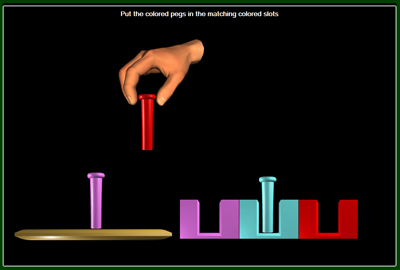
In this particular activity, the task is to put the colored pegs into the matching colored slots.
If using 2 switches, pressing the first switch will move the hand, pressing the second switch will either pick up or put down the peg.
If using 1 switch, the hand will move from one slot to the next automatically and stop for a pre-specified number of seconds.
Pressing the switch will either pick up or put down the peg.
|
| | Program Description |
VIRTUAL MOTOR SKILLS - Program #630 is a software program designed to give the user with limited motor skills
the virtual experience of performing tasks by picking up, putting down, and moving objects around using 1 or 2 switches,
a mouse click, or the computer keyboard. In many of the activities, the user controls a life-like hand to complete tasks such as
picking up colored pegs and placing them in their matching colored slots.
Sounds like it may be difficult or too complex? Well, it couldn't be easier.
In the example of the pegboard, the hand will hover over the pegboard. If the hand is over a peg, pressing the
switch will pick up the peg. If the hand is holding a peg and a switch is pressed, it will put the peg down.
It's that simple.
The program is composed of the following 27 tasks that involve sorting, matching, sequencing, and vocational themes.
- 5 Different Pegboard activities with various degrees of difficulty
- Put in the lightbulbs
- Put the lollypops on the sticks
- Put the tennis balls into the can
- Put the paper into the printer
- Pick up the trash and throw it into the garbage can
- Put all the coins into the piggy bank
- Put the groceries into the shopping bag
- Put the crayons into the crayon box
- Put the wafers into the box
- Pour the grape juice into the cups
- Hammer the nails into the wood
- Stack the blocks to build one big tower
- Match the shoes
- Put the rings on the peg in size order with the biggest on the bottom
- Sharpen the pencils and put them into the pencil holder
- Put the colored boxes over the matching color word
- Sort the objects into the containers with the same shape
- Sort the nuts and bolts
- Sort the silverware
- Put the bottles and cans into the proper recycling container
- Point to the numbers from lowest to highest
- Point to the letters in alphabetical order
| | Skills Introduced | | System Requirements | Hand-Eye Coordination
Scanning
Matching
Sequencing
Sorting
| |
Windows Versions: Windows 10/8/7/Vista/XP
50 meg hard disk space
Minimum 1024x768 screen resolution
|
|
|