Back to Main Menu
| 
|
Scan & Paint
| Item #302
Minimum Cognitive Age Level:
1 Year
Price:
$39 - CD
(Can be installed on one computer at a time)
$29 - Download
(Can be installed on one computer at a time)
$99 - Classroom License CD
(Can be installed on an unlimited number of computers as long as they are in the same physical classroom)
Download Store - Free Trials and Purchases
| | | |
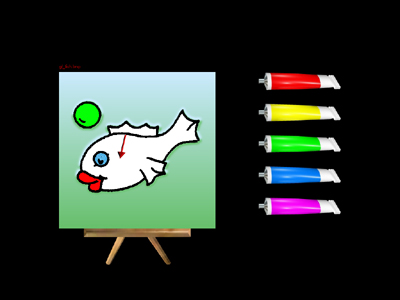
Between two and ten paint tubes are lined up on the right side of the screen. To the left of the paint tubes is a simple picture which contains a few sections that can be colored in. A pointer points to one of these sections. The student must select one of the paint tubes for coloring in the section that the arrow is pointing to by either step scanning, timed scanning or clicking on the paint tube with the mouse or pressing the paint tube with a touch screen. After the section is colored, the pointer will automatically move to the next section to color. Scanning software is built into the program.
|
| | Program Description |
Scan & Paint - Program #302 is a lively software program designed
for students with a cognitive age level of approximately 1 year and up. It introduces many
different concepts while the student enjoys coloring pictures. Scan & Paint comes with over
60 simple pictures and includes categories such as animals, food, holidays and color matching pictures.
There are also instrcutions on how to add your own pictures.
Option in this program include:
Choosing either auditory narration of colors or lively music in the background.
Timed scanning, step scanning with 1 or 2 switches or seleting a paint tube with the mouse.
Selecting a field of between 2 and 10 paint tubes.
Changing the pointer to either an arrow, paint brush or colored cones.
Setting the animation speed.
Print feature enabled or disabled.
Creating different picture lists for different students.
Adding your own pictures.
Changing the narration language to a foreign language.
��������� (see our downloads page for a current list of languages to download)
| | Skills Introduced | | System Requirements | Step Scanning
Timed Scanning
Color Selection
Cause & Effect
Color Matching
Purposeful Coloring
Vertical & Horizontal Tracking
Hand/Eye Coordination
| |
Windows Versions: Windows 10/8/7/Vista/XP
130 meg hard disk space
|
|
|