Back to Main Menu
| 
|
Wheel of Sounds
| Item #219
Minimum Cognitive Age Level:
9 Months
Price:
$39 - CD
(Can be installed on one computer at a time)
$29 - Download
(Can be installed on one computer at a time)
$99 - Classroom License CD
(Can be installed on an unlimited number of computers as long as they are in the same physical classroom)
Download Store - Free Trials and Purchases
| | | |
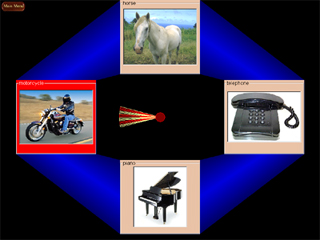
The student selects a picture by activating the spinner with a switch, mouse or touch-screen. Once the picture is selected and the sound is played, a new picture will take its place. Over 90 pictures come with the program. You can also add your own pictures.
|
| | Program Description |
WHEEL OF SOUNDS is a switch-activated game that plays an object's sound
when the object is selected by the spinner. The spinner is activated by either
step scanning, timed scanning, a single switch press, a mouse or touch-screen.
Once the picture is selected and the sound is played, a new picture will take its place.
Wheel of Sounds gives you the capability of
setting the field of pictures to display 2, 3 or 4 pictures at a time,
creating customized games by selecting
only certain pictures to include in a game, and optionally
adding your own pictures and sounds. Included with the program
are separate games for pictures of various objects, a game for letters, a game for colors
and a game for numbers. Auditory scanning is built into the program.
Wheel of Sounds can optionally be used as a matching activity. When "Matching" is turned on,
One of the pictures in the field of pictures is copied to the center of the spinner.
The student must now select the picture that matches the one in the center of the spinner.
If the picture chosen does not match, a voice will tell the student that the picture doesn't
match and the sound associated with the picture is not played. If the picture matches, the
computer will say "very good" and then it will play the sound associated with the picture.
Statistics on the percentages of correct and incorrect matches are optionally saved to monitor
the student's progress.
| | Skills Introduced | | System Requirements | Cause & Effect
Scanning
Sound Recognition
Matching
Letter, Number and Color Recognition
| |
Windows Versions: Windows Windows 10/8/7/Vista/XP
50 meg hard disk space
|
|
|